cNORM — Parametric Continuous Norming
This application models norm scores such as percentiles, T scores, IQ scores or z scores for psychometric, biometric and other data, using parametric continuous norming. Rather than norming each age group separately, the full distribution of the raw score is modelled as a smooth function of age. This interpolates between age groups, stabilizes the estimates at the tails and reduces the sample size required for stable norms.
Quick start
- Data Input – select a built-in example or upload your own file. Review the data in the preview table.
- Modeling – select the age, raw-score and (optionally) weight variable,
choose the distribution family, set the polynomial degrees and the norm scale,
and click Compute Model. Check the percentile plot and the model summary.
The fitted model can be downloaded as an
.rdsfile. - Norm Tables – enter the ages for which you need tables, define the raw-score range, optionally add confidence intervals and click Generate Tables. The tables can be downloaded as a CSV file.
How parametric continuous norming works
At every age, the raw score is assumed to follow a probability distribution from a selected family (see below). The parameters of this distribution (e. g. location, scale, skewness) are not constant but are modelled as polynomial functions of age; the polynomial degree controls how flexibly each parameter may change with age. The coefficients are estimated by (optionally weighted) maximum likelihood from the whole sample at once, so that all observations inform the estimate at every age.
To obtain a norm score, the observed raw score is converted into its cumulative probability (percentile) under the distribution fitted for the person's age, and this percentile is transformed to the chosen norm scale. The procedure is continuous in age, so ages need not coincide with the age groups of the standardization sample.
Data requirements
- Age variable – numeric explanatory variable, ideally recorded
continuously (e. g. decimal years). A variable named
ageis preselected automatically. - Raw-score variable – numeric test score. Variables named
fluency,raworscoreare preselected automatically; otherwise please check the selection. The permissible scale depends on the family (see below). - Weight variable (optional) – case weights, e. g. post-stratification
weights that correct for deviations of the sample from the population
(see
computeWeights()in the R package). - File formats –
.csv(comma-separated, with header row),.xlsx/.xls(first sheet),.sav(SPSS) and.rda(the first object in the file is used). An uploaded file overrides the selected example, and loading new data resets the current model and tables.
Choosing the distribution family
| Family | Typical data | Parameters (polynomial in age) |
|---|---|---|
| Sinh-Arcsinh (SHASH) | Continuous, unbounded scores; response times, difference scores, biometric data (e. g. BMI, height, weight). | μ (location), σ (scale), ε (skewness), δ (tail weight). Default degrees 3, 2, 2, 1. δ may alternatively be fixed to a constant (δ = 1 with ε = 0 corresponds to the normal distribution). |
| Beta-Binomial | Accuracy and power tests with a fixed number of items n (scores 0 to n), e. g. vocabulary or comprehension tests. Particularly appropriate for Rasch (1PL) scaled tests. | α and β (shape parameters). Default degrees 3 and 3. The norm table covers the entire range from 0 to n. |
| Conway-Maxwell-Poisson (CMP) new in cNORM 3.7 |
Speeded tests, rates and counts (non-negative integers), such as the number of items processed within a time limit; scores may have a ceiling. | μ (location) and ν (dispersion). Default degrees 3 and 2. ν = 1 is the Poisson distribution, ν < 1 indicates over-dispersion and ν > 1 under-dispersion, as is typical for speeded tests with bounded scores. |
Family-specific options
- SHASH – δ can be fixed instead of being modelled as a polynomial, which is a useful simplification when the tails do not change noticeably with age.
- Beta-Binomial – the number of items n is the maximum attainable score.
If this maximum is not observed in your data, please fit the model on the R console
and set the number of items explicitly (see
?cnorm.betabinomial). - CMP – the dispersion ν can be modelled as a polynomial (degree 0 yields one constant, estimated value) or fixed to a value (e. g. 1 for a Poisson model). If the test has a ceiling, activate right-truncation and enter the maximum attainable score, so that no probability mass is assigned to scores above it. Raw scores must be non-negative integers.
Selecting polynomial degrees
The degree of a parameter determines how it may vary with age: degree 0 is constant, 1 is linear, 2 is quadratic and so on. Higher degrees capture more complex developmental trajectories but increase the risk of overfitting. Recommended strategy:
- Start with the default degrees for the selected family.
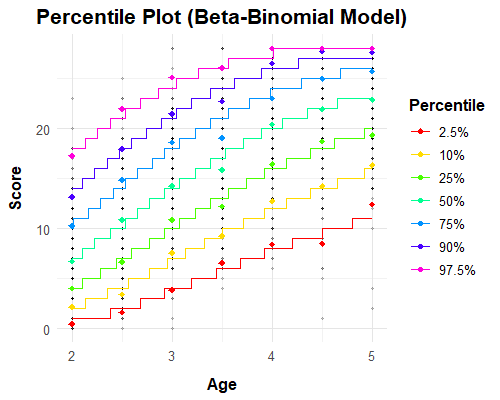
- Inspect the percentile plot, which shows observed percentiles (points) against the model predictions (lines). Systematic deviations between points and lines suggest that degrees are too low; wavy lines indicate overfitting, so reduce the degrees.
- Compare competing specifications using the Summary tab (parameter estimates and fit information). Prefer the most parsimonious model that reproduces the empirical percentiles well.
- Do not interpret the norms outside the age range covered by your sample, and be cautious with extreme percentiles in age ranges with few observations.
Norm scales
Norm scores can be expressed as T scores (M = 50, SD = 10), IQ scores (M = 100, SD = 15) or z scores (M = 0, SD = 1). Percentile ranks are included in the norm tables.
Generating norm tables
- Ages – enter one or more ages separated by commas or spaces (e. g.
7, 8, 9, 10); one table per age is created. - Raw-score range – start, end and step size are preset from your data. For CMP, scores are integers and percentiles are evaluated with a mid-p adjustment. For the Beta-Binomial family, the complete range 0 to n is generated and start/end can only be used to restrict the display.
- Confidence intervals – optionally specify a confidence level and the reliability coefficient of the test; the intervals reflect measurement error of the test and are added to the norm scores.
Built-in example data sets
Selecting an example automatically sets the matching distribution family.
| Data set | Description | Family |
|---|---|---|
| speed | Reading fluency, speeded word–picture matching task; ages 7–11, scores 0–75
(score variable fluency; the ceiling of 75 is set automatically). | CMP |
| elfe | Reading comprehension test; ages 6–10, scores 0–28. | Beta-Binomial |
| ppvt | Peabody Picture Vocabulary Test IV; ages 2.5–17.5, scores 0–228. | Beta-Binomial |
| CDC | Growth data of the CDC (BMI, weight, height); ages 2–18. | SHASH |
Working on the R console
The app covers the core workflow. Additional options, such as automatic selection of
polynomial degrees (autoselect.shash(), autoselect.betabinomial())
and further diagnostics, are available in the R package. A downloaded model (.rds)
can be reloaded with readRDS() and used for further predictions.
library(cNORM)

model <- cnorm.cmp(age = speed$age, score = speed$fluency,
                   mu_degree = 3, nu_degree = 2, max_score = 75)
summary(model, age = speed$age, score = speed$fluency)
tables <- normTable.cmp(model, ages = c(8, 9, 10), start = 0, end = 75)

vignette("BetaBinomial", package = "cNORM")
Further information: Psychometrica
and the package vignettes on CRAN.
The package can also be launched locally with cNORM.GUI().
Privacy
When launched locally, all data stays on your computer. The online application is hosted on ISO 27001-certified IONOS servers located in the European Union (Frankfurt, Germany), in compliance with the General Data Protection Regulation (GDPR). cNORM does not store uploaded data; nothing you upload is retained.
Citation and references
Please cite the package (see citation("cNORM")) and the methodological papers
relevant to your analysis.
- cNORM on CRAN · Tutorial & manual · GitHub (issues & source)
- Lenhard, A., Lenhard, W., Suggate, S. & Segerer, R. (2018). A continuous solution to the norming problem. Assessment, 25(1), 112–125. doi:10.1177/1073191116656437
- Lenhard, A., Lenhard, W. & Gary, S. (2019). Continuous norming of psychometric tests: A simulation study of parametric and semi-parametric approaches. PLoS ONE, 14(9), e0222279.
- Lenhard, W. & Lenhard, A. (2021). Improvement of norm score quality via regression-based continuous norming. Educational and Psychological Measurement, 81(2), 229–261. doi:10.1177/0013164420928457
- Gary, S., Lenhard, W. & Lenhard, A. (2021). Modelling norm scores with the cNORM package in R. Psych, 3(3), 501–521. doi:10.3390/psych3030033
- Jones, M. C. & Pewsey, A. (2009). Sinh-arcsinh distributions. Biometrika, 96(4), 761–780.
- Shmueli, G., Minka, T. P., Kadane, J. B., Borle, S. & Boatwright, P. (2005). A useful distribution for fitting discrete data: Revival of the Conway–Maxwell–Poisson distribution. Journal of the Royal Statistical Society C, 54(1), 127–142.